

JetEngine CCTS
JetEngine (Crocoblock) eklentisiyle entegrasyon.
GraphQL şemasına, Custom Content Type (CCT) verilerini sorgulamak için alanlar eklenir.
Kök alanlar
| Alan | Açıklama |
|---|---|
jetengineCCTEntries | CCT girdilerinin listesini döndürür (JetEngineCCTEntry türü). |
jetengineCCTEntryCount | CCT girdilerinin sayısını döndürür. |
jetengineCCTEntry | Tek bir CCT girdisi döndürür (JetEngineCCTEntry türü). |
CCT slug'ı, slug argümanı aracılığıyla sağlanmalıdır (CCT, eklenti Ayarlarında sorgulanabilir olarak işaretlenmiş olmalıdır; aşağıya bakın).
JetEngineCCTEntry türü
JetEngineCCTEntry türünde, alan değerlerini şu alanlar aracılığıyla sorgulayabiliriz:
| Alan | Açıklama |
|---|---|
id | Girdinin veritabanı ID'si. |
uniqueID | Girdi için CCT slug'ı ve girdinin ID'sinden oluşan benzersiz tanımlayıcı. |
cctSlug | Bu girdinin ait olduğu CCT'nin slug'ı. |
status | Girdinin durumu (ör. publish, draft). |
createdDate | Girdinin oluşturulma tarihi. |
createdDateStr | Girdinin oluşturulma tarihi, dizge olarak biçimlendirilmiş. |
modifiedDate | Girdinin son değiştirilme tarihi. |
modifiedDateStr | Girdinin son değiştirilme tarihi, dizge olarak biçimlendirilmiş. |
authorID | Girdinin yazarının ID'si. |
author | Yazar kullanıcı bağlantı nesnesi. |
singleCustomPostID | Bağlantılı tekil custom post'un ID'si (varsa). |
singleCustomPost | Bağlantılı tekil custom post bağlantı nesnesi. |
fieldValues | O girdi için tüm CCT alanlarını içeren bir JSON nesnesi. |
fieldValue(slug) | Slug'a göre tek bir alan sorgulamak için. |
CCT alan değerleri
fieldValue(slug) ve fieldValues içindeki her anahtardan elde edilen değerler, CCT'de tanımlanan alan türüne göre dönüştürülür.
Örtük ID alanları (mevcut ve boş olmadığında her zaman int türüne dönüştürülür): id, singleCustomPostID, authorID.
Her CCT alan türünün GraphQL yanıtında nasıl dönüştürüldüğü:
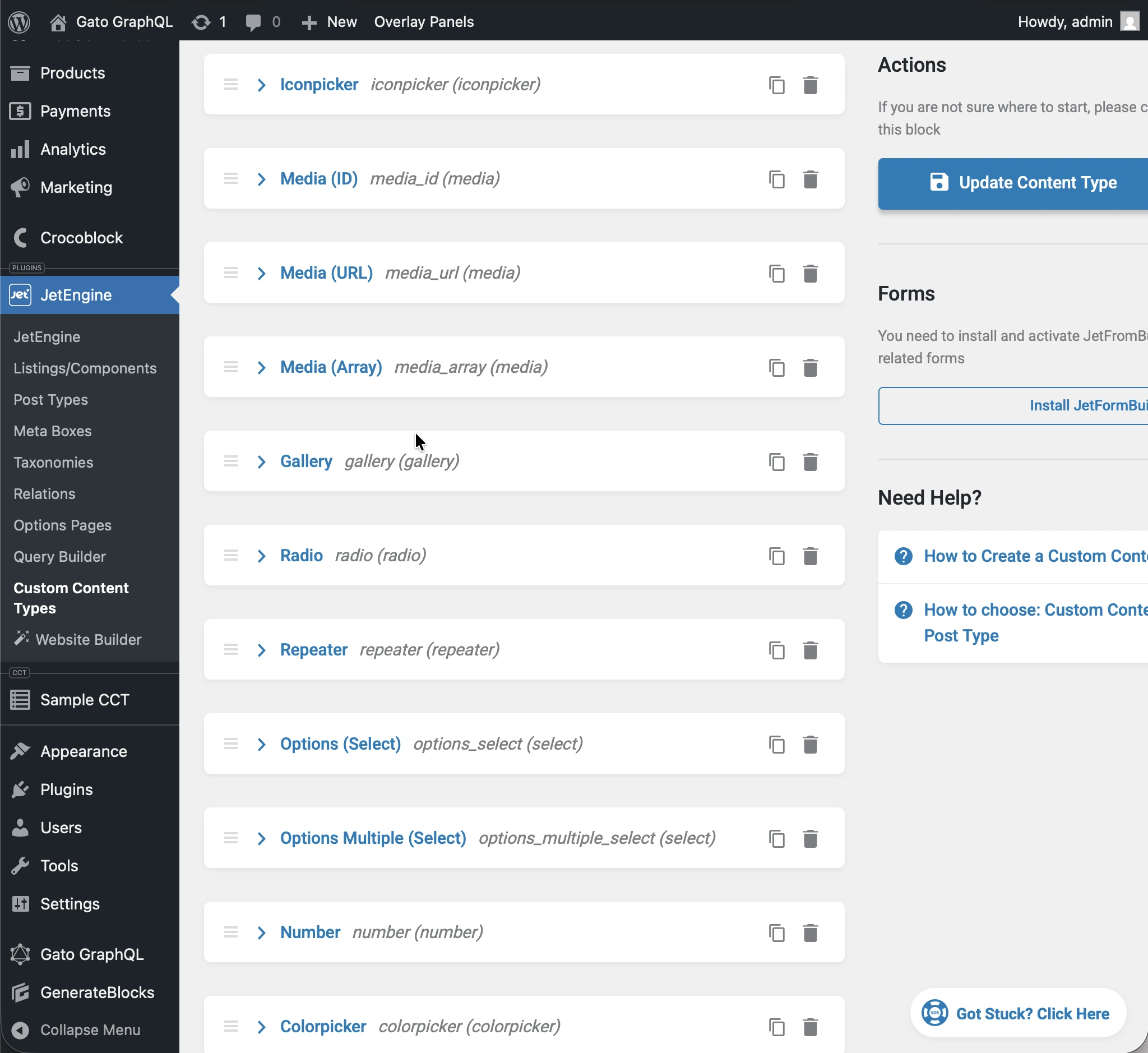
float; aksi takdirde int.1, true, yes, on için true (büyük/küçük harf duyarsız).int; "Both" → { id, url } nesnesi; aksi takdirde değişmeden.int[].int; çoklu → int[].Aşağıdaki örnek, "sample_cct" slug'ına sahip ve farklı türlerde alanları (text, number, gallery vb.) olan bir CCT kullanmaktadır.
Aşağıdaki query çalıştırıldığında:
query JetEngineCCTEntries {
jetengineCCTEntry(cctSlug: "sample_cct", by: { id: 1 }) {
label_text: fieldValue(slug: "label_text")
textarea: fieldValue(slug: "textarea")
date: fieldValue(slug: "date")
time: fieldValue(slug: "time")
datetime: fieldValue(slug: "datetime")
wysisyg: fieldValue(slug: "wysisyg")
switcher: fieldValue(slug: "switcher")
checkbox: fieldValue(slug: "checkbox")
checkbox_array: fieldValue(slug: "checkbox_array")
iconpicker: fieldValue(slug: "iconpicker")
media_id: fieldValue(slug: "media_id")
media_url: fieldValue(slug: "media_url")
media_array: fieldValue(slug: "media_array")
gallery: fieldValue(slug: "gallery")
radio: fieldValue(slug: "radio")
repeater: fieldValue(slug: "repeater")
options_select: fieldValue(slug: "options_select")
options_multiple_select: fieldValue(slug: "options_multiple_select")
number: fieldValue(slug: "number")
colorpicker: fieldValue(slug: "colorpicker")
post: fieldValue(slug: "post")
posts: fieldValue(slug: "posts")
}
}...yanıttaki her alan kendi CCT türüne dönüştürülür:
{
"data": {
"jetengineCCTEntry": {
"label_text": "Some label",
"textarea": "Some description here\r\n\r\nSome description there",
"date": "2026-01-24",
"time": "09:13",
"datetime": "2026-03-07T08:00",
"wysisyg": "<p>Some <strong>description</strong> here</p>\n<p><em>Some description</em> there</p>\n<p>Some <a href=\"https://gatoplugins.com\">link</a></p>\n",
"switcher": true,
"checkbox": {
"one": true,
"two": false,
"three": true
},
"checkbox_array": [
"one",
"two"
],
"iconpicker": "fa fa-road",
"media_id": 1362,
"media_url": "https://gatographql.com/wp-content/uploads/GatoGraphQL-logo.webp",
"media_array": {
"id": 1380,
"url": "https://gatographql.com/wp-content/uploads/Funny-Dog.jpg"
},
"gallery": [
1361,
1362,
1363
],
"radio": "1",
"repeater": [
{
"label_(text)": "First item in repeater",
"date": "2026-01-17",
"time": "11:00",
"datetime": "2026-01-16T11:16",
"textarea": "Gato GraphQL provides a multitude of interactive clients,",
"wysiwyg": "<p>Gato GraphQL provides a <strong>multitude of interactive clients</strong>, and a user interface based on the <a href=\"https://wordpress.org\">WordPress editor</a>, so that anybody can operate it, whether a developer or not.</p>\n",
"switcher": true,
"iconpicker": "fa fa-inbox",
"media_id": 1361,
"media_url": "https://gatographql.com/wp-content/uploads/Funny-Dog.jpg",
"media_array": {
"id": 1380,
"url": "https://gatographql.com/wp-content/uploads/Funny-Dog.jpg"
},
"gallery": [
1363,
1361
],
"radio": "two",
"options_select": "three",
"options_multiple_select": [
"two",
"four"
],
"number": 22,
"colorpicker": "#757575",
"post": 1140,
"posts": [
1,
2
]
},
{
"label_(text)": "Second item in repeater",
"date": "2026-01-15",
"time": "00:18",
"datetime": "2026-01-18T00:00",
"textarea": "These clients make it very easy to interact with Gato GraphQL",
"wysiwyg": "<p>These clients <strong>make it very easy to interact with Gato GraphQL</strong>, directly within the <em>wp-admin</em> (and without the need of any PHP code), reducing friction and removing barriers so that anyone (developers and non-developers alike) can use it.</p>\n",
"switcher": false,
"iconpicker": "fa fa-search-plus",
"media_id": 1362,
"media_url": "https://gatographql.com/wp-content/uploads/LICENSE.txt",
"media_array": {
"id": 1363,
"url": "https://gatographql.com/wp-content/uploads/LICENSE.txt"
},
"gallery": [
1380,
1361,
1362
],
"radio": "three",
"options_select": "three",
"options_multiple_select": [
"three"
],
"number": 4469,
"colorpicker": "#2d2270",
"post": 2,
"posts": [
1688,
1682
]
}
],
"options_select": "1",
"options_multiple_select": [
"one",
"two",
"five"
],
"number": 66778899,
"colorpicker": "#721abf",
"post": 1,
"posts": [
1140,
1113
]
}
}
}fieldValues tarafından döndürülen JSON'daki her alan için aynı tür dönüşümü geçerlidir:
query JetEngineCCTEntries {
jetengineCCTEntry(cctSlug: "sample_cct", by: { id: 1 }) {
fieldValues
}
}...döndürülen sonuç:
{
"data": {
"jetengineCCTEntry": {
"fieldValues": {
"label_text": "Some label",
"textarea": "Some description here\r\n\r\nSome description there",
"date": "2026-01-24",
"time": "09:13",
"datetime": "2026-03-07T08:00",
"wysisyg": "<p>Some <strong>description</strong> here</p>\n<p><em>Some description</em> there</p>\n<p>Some <a href=\"https://gatoplugins.com\">link</a></p>\n",
"switcher": true,
"checkbox": {
"one": true,
"two": false,
"three": true
},
"checkbox_array": [
"one",
"two"
],
"iconpicker": "fa fa-road",
"media_id": 1362,
"media_url": "https://gatographql.com/wp-content/uploads/GatoGraphQL-logo.webp",
"media_array": {
"id": 1380,
"url": "https://gatographql.com/wp-content/uploads/Funny-Dog.jpg"
},
"gallery": [
1361,
1362,
1363
],
"radio": "1",
"repeater": [
{
"label_(text)": "First item in repeater",
"date": "2026-01-17",
"time": "11:00",
"datetime": "2026-01-16T11:16",
"textarea": "Gato GraphQL provides a multitude of interactive clients,",
"wysiwyg": "<p>Gato GraphQL provides a <strong>multitude of interactive clients</strong>, and a user interface based on the <a href=\"https://wordpress.org\">WordPress editor</a>, so that anybody can operate it, whether a developer or not.</p>\n",
"switcher": true,
"iconpicker": "fa fa-inbox",
"media_id": 1361,
"media_url": "https://gatographql.com/wp-content/uploads/Funny-Dog.jpg",
"media_array": {
"id": 1380,
"url": "https://gatographql.com/wp-content/uploads/Funny-Dog.jpg"
},
"gallery": [
1363,
1361
],
"radio": "two",
"options_select": "three",
"options_multiple_select": [
"two",
"four"
],
"number": 22,
"colorpicker": "#757575",
"post": 1140,
"posts": [
1,
2
]
},
{
"label_(text)": "Second item in repeater",
"date": "2026-01-15",
"time": "00:18",
"datetime": "2026-01-18T00:00",
"textarea": "These clients make it very easy to interact with Gato GraphQL",
"wysiwyg": "<p>These clients <strong>make it very easy to interact with Gato GraphQL</strong>, directly within the <em>wp-admin</em> (and without the need of any PHP code), reducing friction and removing barriers so that anyone (developers and non-developers alike) can use it.</p>\n",
"switcher": false,
"iconpicker": "fa fa-search-plus",
"media_id": 1362,
"media_url": "https://gatographql.com/wp-content/uploads/LICENSE.txt",
"media_array": {
"id": 1363,
"url": "https://gatographql.com/wp-content/uploads/LICENSE.txt"
},
"gallery": [
1380,
1361,
1362
],
"radio": "three",
"options_select": "three",
"options_multiple_select": [
"three"
],
"number": 4469,
"colorpicker": "#2d2270",
"post": 2,
"posts": [
1688,
1682
]
}
],
"options_select": "1",
"options_multiple_select": [
"one",
"two",
"five"
],
"number": 66778899,
"colorpicker": "#721abf",
"post": 1,
"posts": [
1140,
1113
]
}
}
}
}CCT'lere erişim izni verme
Varsayılan olarak hiçbir CCT sorgulanamaz.
Bir CCT'ye erişim izni vermek için, CCT'nin eklenti Ayarlarında sorgulanabilir olarak ayarlanması gerekir.
Bu yapılandırmanın gerçekleşebileceği öncelik sırasına göre 2 yer vardır:
- Özel: İlgili Şema Yapılandırmasında
- Genel: Ayarlar sayfasında
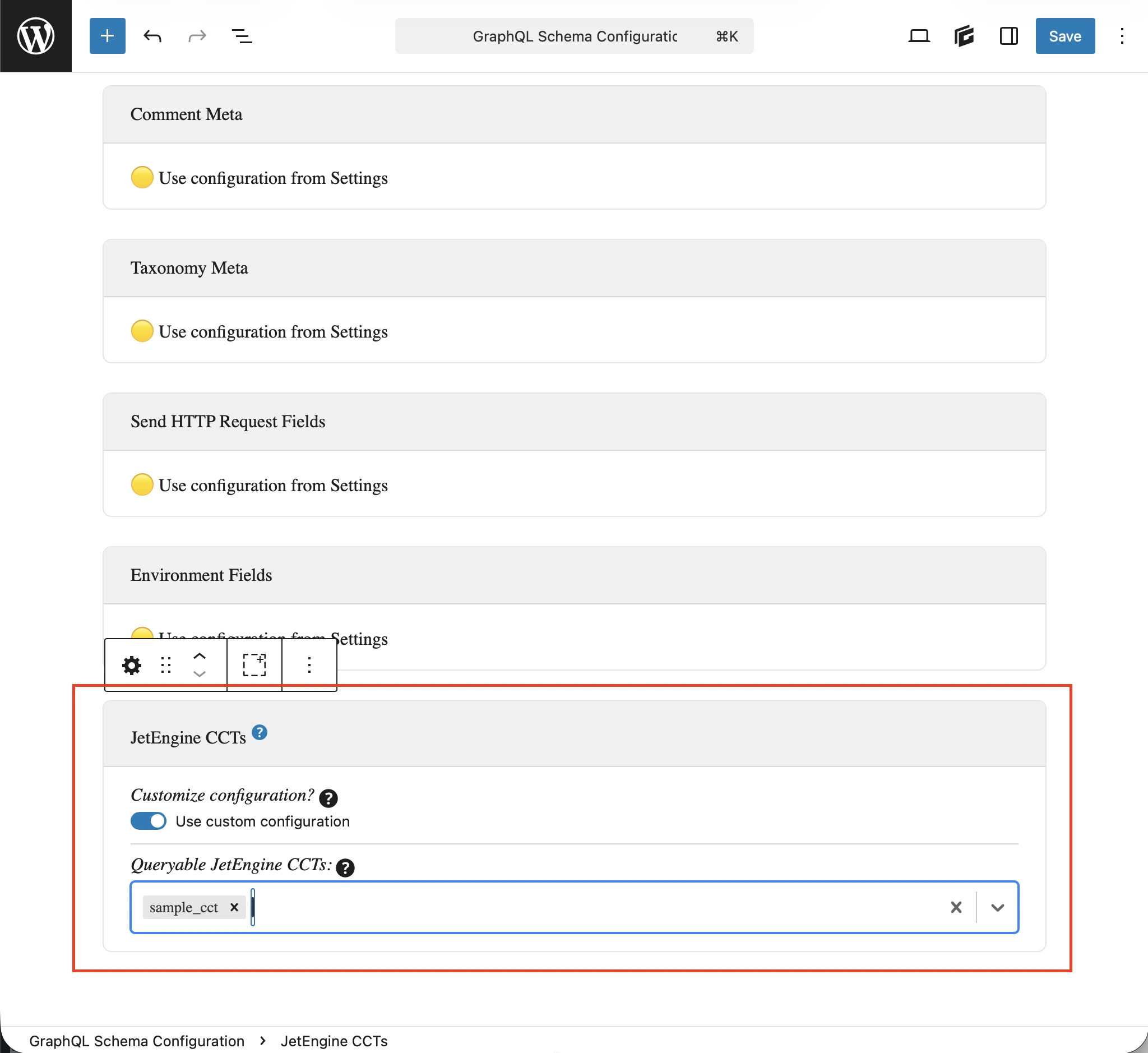
Uç noktaya uygulanan Şema Yapılandırmasında Özel yapılandırma kullan seçeneğini seçin ve ardından istenen girdileri girin:
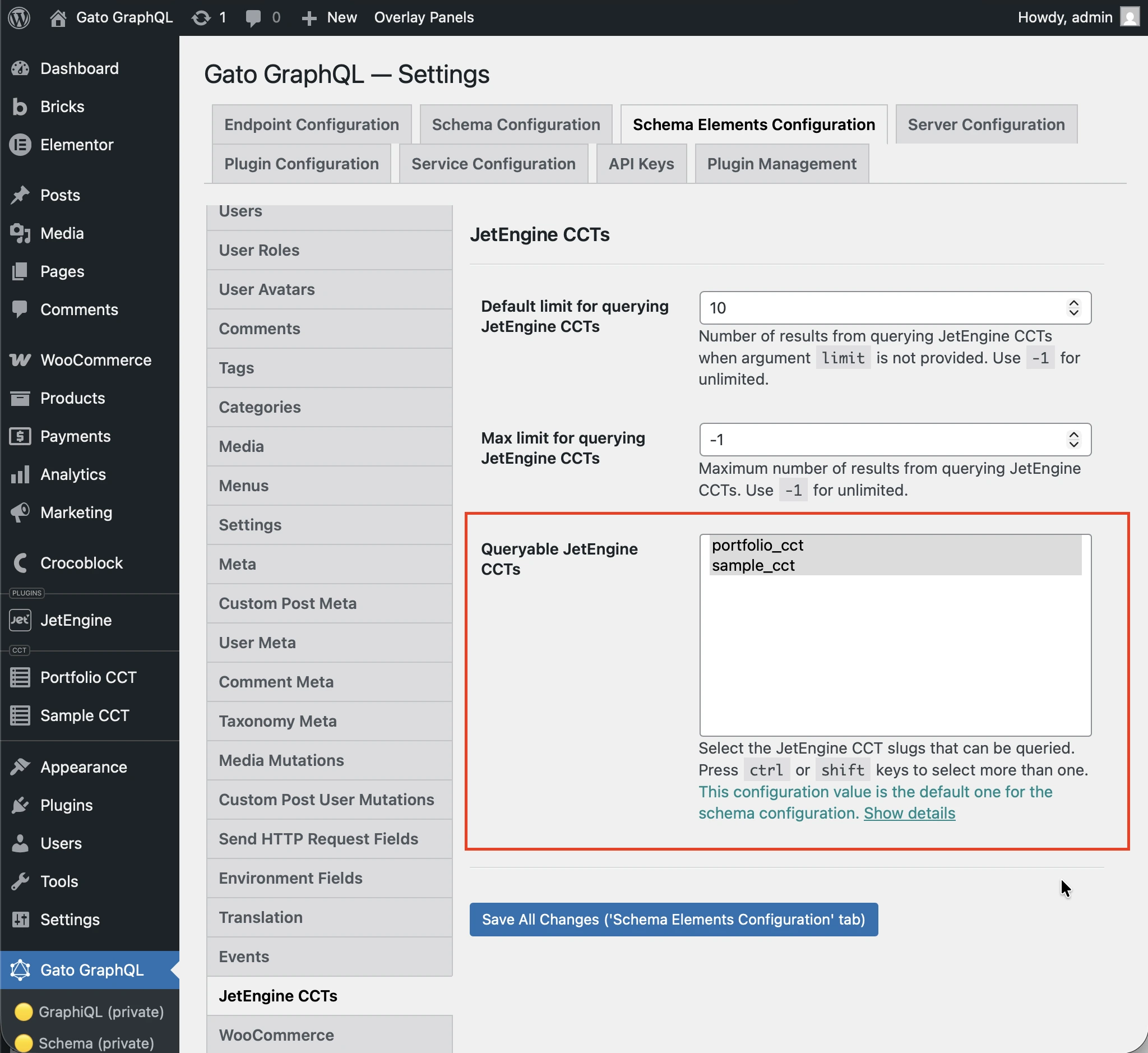
Aksi takdirde, Ayarlar'daki JetEngine CCTS bölümünün altındaki Queryable JetEngine CCTS seçeneğinde tanımlanan girdiler kullanılır:
Örnek Queries
CCT girdilerini listele:
query {
jetengineCCTEntries(cctSlug: "sample_cct") {
id
uniqueID
cctSlug
status
createdDate
modifiedDate
authorID
author {
id
name
}
singleCustomPostID
singleCustomPost {
id
title
}
fieldValues
someField: fieldValue(slug: "some_field_slug")
}
}Slug ve ID'ye göre tek CCT girdisi:
query {
jetengineCCTEntry(cctSlug: "sample_cct", by: { id: 1 }) {
id
uniqueID
cctSlug
status
createdDate
modifiedDate
author {
id
name
}
singleCustomPost {
id
title
}
fieldValues
someField: fieldValue(slug: "some_field_slug")
}
}Filtre, sayfalama ve sıralama ile CCT girdilerini listele ve say:
query {
jetengineCCTEntryCount(
cctSlug: "sample_cct"
filter: { search: [{ field: "cct_author_id", value: 1, operator: EQUALS }] }
)
jetengineCCTEntries(
cctSlug: "sample_cct"
filter: { search: [{ field: "cct_author_id", value: 1, operator: EQUALS }] }
pagination: { limit: 10, offset: 0 }
sort: { by: "cct_created", order: DESC }
) {
id
authorID
}
}