

HTTP İstemcisi
GraphQL şemasına bir web sunucusuna HTTP istekleri göndermek ve yanıtlarını almak için alanlar eklenir:
_sendJSONObjectItemHTTPRequest_sendJSONObjectItemHTTPRequests_sendJSONObjectCollectionHTTPRequest_sendJSONObjectCollectionHTTPRequests_sendHTTPRequest_sendHTTPRequests_sendGraphQLHTTPRequest_sendGraphQLHTTPRequests
Güvenlik nedeniyle, bağlanılabilecek URL'ler açıkça yapılandırılmalıdır.
Alan listesi
Şemaya aşağıdaki alanlar eklenir.
_sendJSONObjectItemHTTPRequest
Tek bir JSON nesnesi için (REST) yanıtını alır.
İmza: _sendJSONObjectItemHTTPRequest(input: HTTPRequestInput!): JSONObject.
_sendJSONObjectItemHTTPRequests
Birden fazla uç noktadan tek bir JSON nesnesi için (REST) yanıtını alır; asenkron (paralel) veya senkron (birbiri ardına) olarak çalıştırılır.
İmza: _sendJSONObjectItemHTTPRequests(async: Boolean = true, inputs: [HTTPRequestInput!]!): [JSONObject].
_sendJSONObjectCollectionHTTPRequest
Bir JSON nesneleri koleksiyonu için (REST) yanıtını alır.
İmza: _sendJSONObjectCollectionHTTPRequest(input: HTTPRequestInput!): [JSONObject].
_sendJSONObjectCollectionHTTPRequests
Birden fazla uç noktadan bir JSON nesneleri koleksiyonu için (REST) yanıtını alır; asenkron (paralel) veya senkron (birbiri ardına) olarak çalıştırılır.
İmza: _sendJSONObjectCollectionHTTPRequests(async: Boolean = true, inputs: [HTTPRequestInput!]!): [[JSONObject]].
_sendHTTPRequest
Belirtilen URL'ye bağlanır ve aşağıdaki alanları içeren bir HTTPResponse nesnesi alır:
statusCode: Int!contentType: String!body: String!headers: JSONObject!header(name: String!): StringhasHeader(name: String!): Boolean!
İmza: _sendHTTPRequest(input: HTTPRequestInput!): HTTPResponse.
_sendHTTPRequests
_sendHTTPRequest alanına benzer ancak birden fazla URL alır ve bunlara asenkron (paralel) olarak bağlanmaya olanak tanır.
İmza: _sendHTTPRequests(async: Boolean = true, inputs: [HTTPRequestInput!]!): [HTTPResponse].
_sendGraphQLHTTPRequest
Sağlanan uç noktaya karşı bir GraphQL queries çalıştırır ve yanıtı JSON nesnesi olarak alır.
Bu alanın girdisi, GraphQL için beklenen verileri kabul eder: uç nokta, GraphQL queries, değişkenler ve işlem adı; varsayılan yöntemi (POST) ve içerik türünü (application/json) önceden ayarlar.
İmza: _sendGraphQLHTTPRequest(input: GraphQLRequestInput!): JSONObject.
_sendGraphQLHTTPRequests
_sendGraphQLHTTPRequests alanına benzer ancak birden fazla GraphQL queries eş zamanlı olarak çalıştırır; asenkron (paralel) veya senkron (birbiri ardına).
İmza: _sendGraphQLHTTPRequests(async: Boolean = true, inputs: [GraphQLRequestInput!]!): JSONObject.
İzin verilen URL'lerin yapılandırılması
Bağlanabileceğimiz URL'lerin listesini yapılandırmamız gerekir.
Her giriş şunlardan biri olabilir:
/veya#ile çevreleniyorsa bir regex (düzenli ifade), ya da- Aksi takdirde tam URL
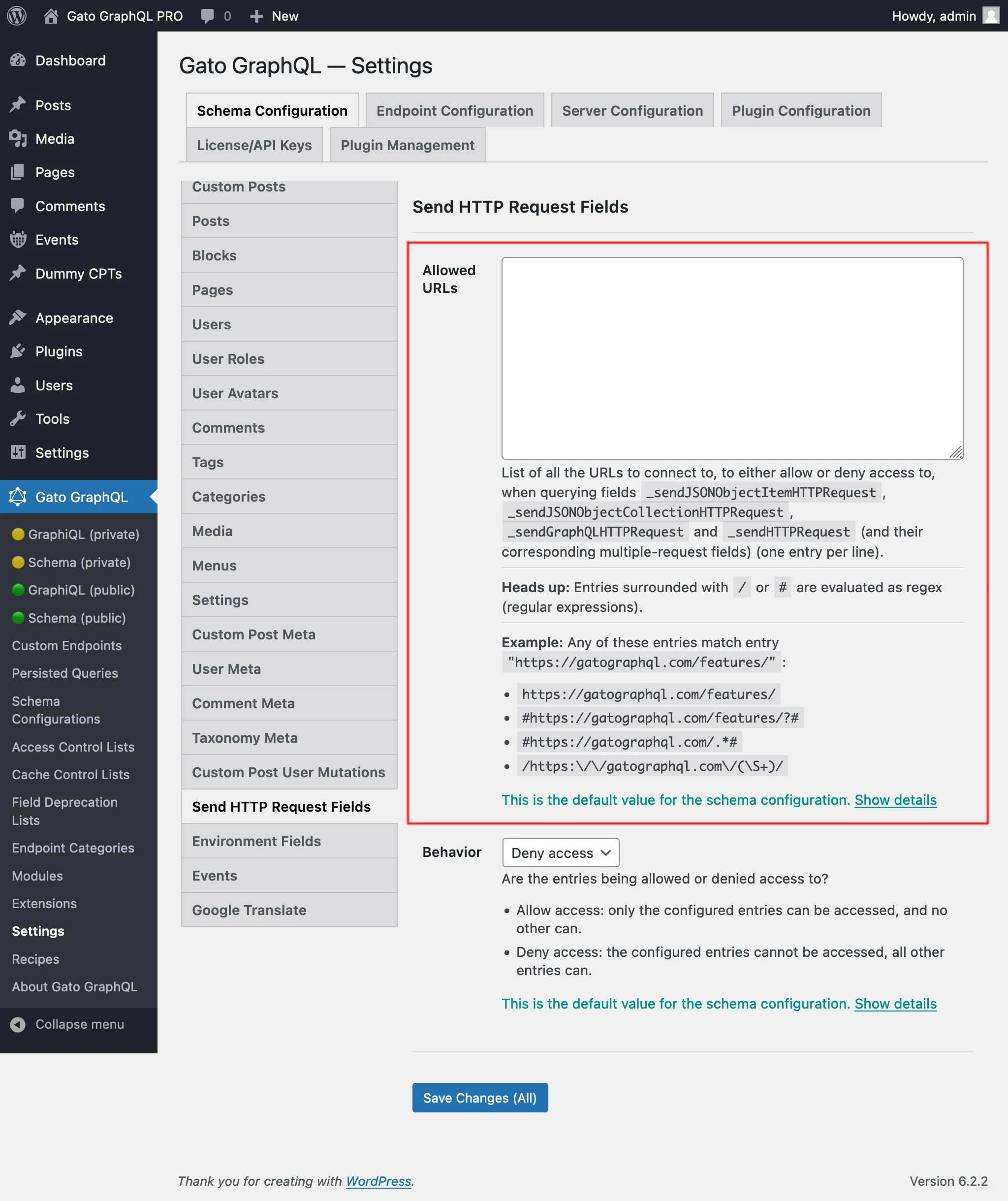
Örneğin, aşağıdaki girişlerin herhangi biri "https://gatographql.com/recipes/" URL'siyle eşleşir:
https://gatographql.com/recipes/#https://gatographql.com/recipes/?##https://gatographql.com/.*#/https:\\/\\/gatographql.com\\/(\S+)/
Bu yapılandırmanın gerçekleşebileceği öncelik sırasına göre 2 yer vardır:
- Özel: İlgili Şema Yapılandırmasında
- Genel: Ayarlar sayfasında
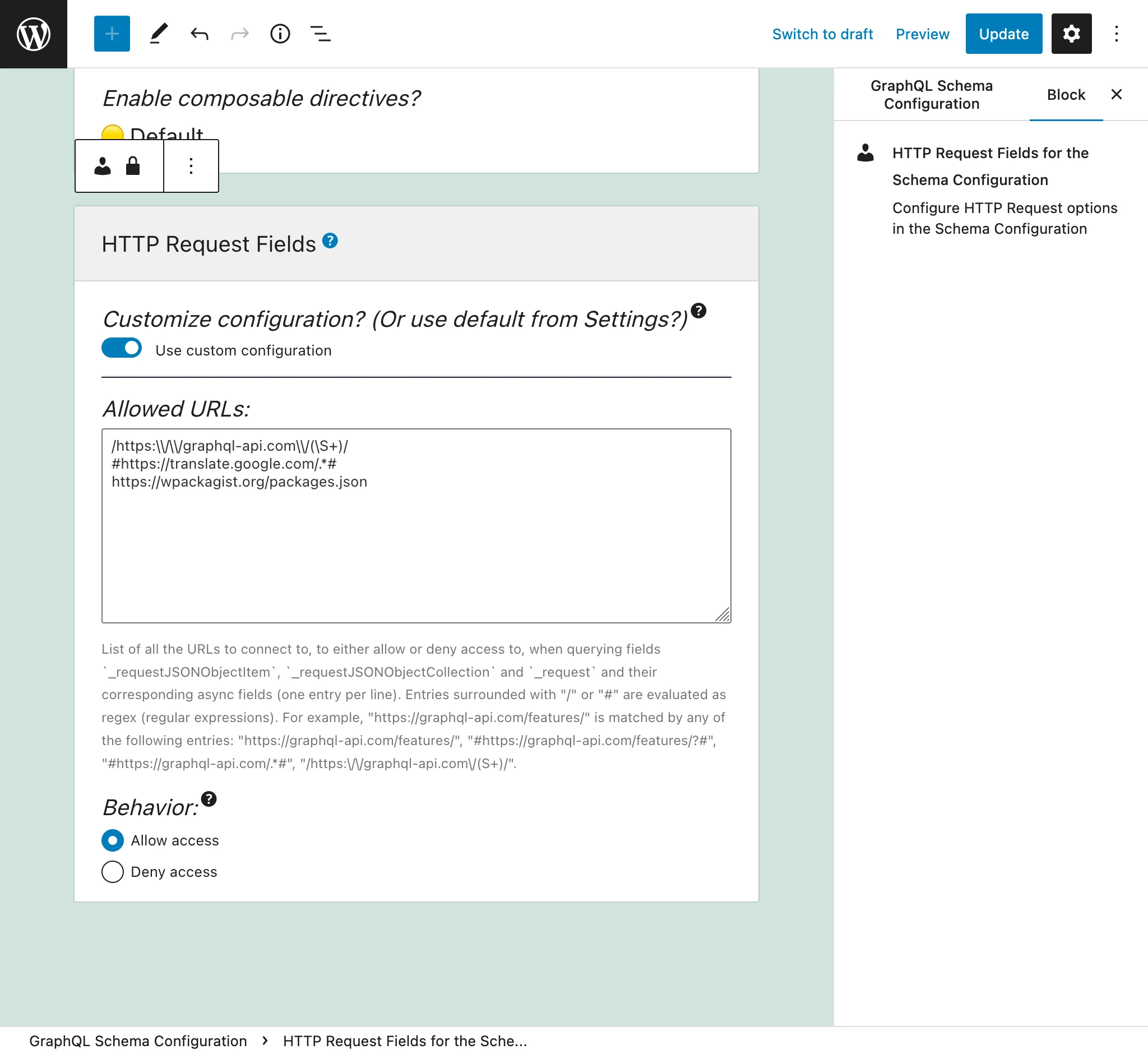
Uç noktaya uygulanan Şema Yapılandırmasında "Use custom configuration" seçeneğini seçin ve ardından istenen girişleri girin:
Aksi takdirde, Ayarlar'daki "Send HTTP Request Fields" sekmesinde tanımlanan girişler kullanılır:
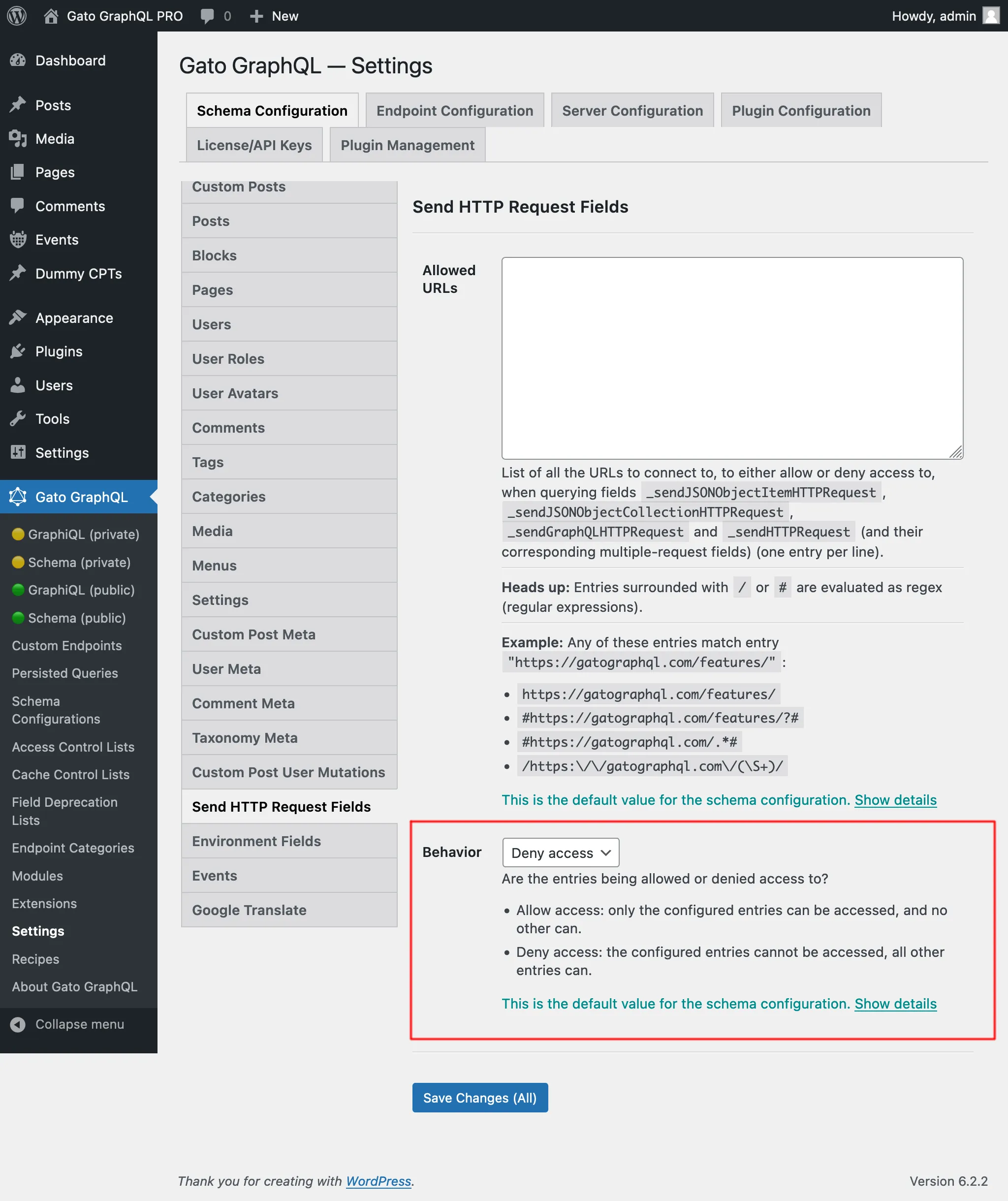
"Allow access" ve "Deny access" olmak üzere 2 davranış vardır:
- Allow access: yalnızca yapılandırılmış girişlere erişilebilir, diğerlerine erişilemez
- Deny access: yapılandırılmış girişlere erişilemez, diğer tüm girişlere erişilebilir
İç URL'lere erişim için gerekli yetenek
Bazı URL'ler iç adreslere (127.0.0.1, link-local aralıkları, cloud-metadata uç noktaları vb.) çözümlenir; bu durum, erişildiğinde iç hizmetleri açığa çıkarabilir. Bu ayar, Plugin Configuration > HTTP Client altında Ayarlar sayfasında yapılandırılır.
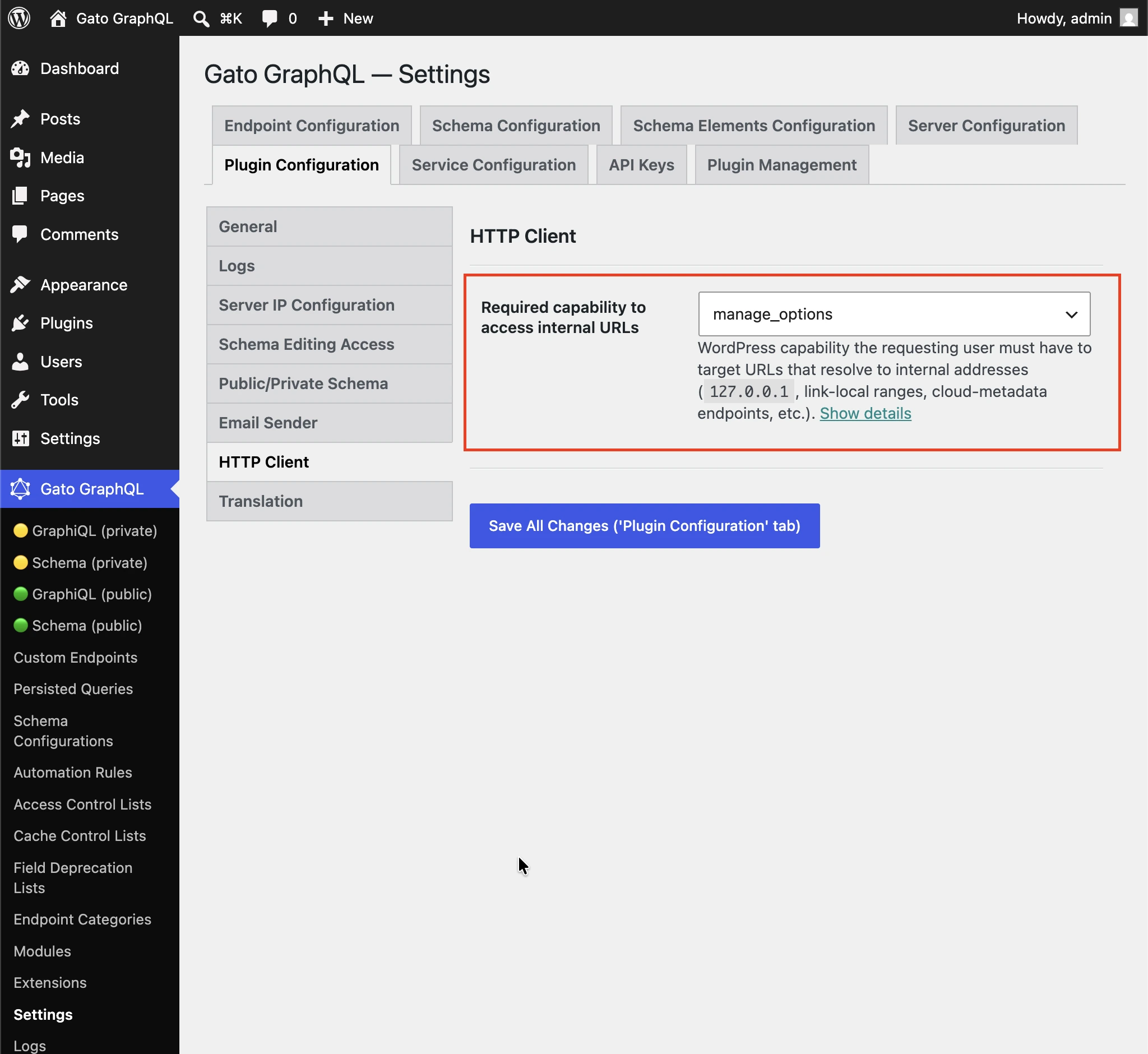
İç adreslere (127.0.0.1, link-local aralıkları, cloud-metadata uç noktaları vb.) çözümlenen URL'leri hedeflemek için talep eden kullanıcının sahip olması gereken WordPress yeteneği.
Yönetici olmayan kullanıcıların HTTP İstemcisi alanları aracılığıyla iç hizmetlere erişememesi için varsayılan olarak manage_options olarak ayarlanmıştır.
Yetenek denetimini devre dışı bırakmak için (oturum açmış herhangi bir kullanıcı) seçeneğini belirleyin.
Her alanı ne zaman kullanmalı
Tüm alanlar benzer ancak farklıdır.
_sendJSONObjectItemHTTPRequest
Bu alan, bir JSON nesnesi öğesi alır; bu, WP REST API uç noktası /wp-json/wp/v2/posts/1/ gibi bir REST uç noktasından tek bir öğe sorgulanırken kullanışlıdır.
Bu queries:
{
postData: _sendJSONObjectItemHTTPRequest(input: { url: "https://newapi.getpop.org/wp-json/wp/v2/posts/1/" } )
}...şu yanıtı alır:
{
"data": {
"postData": {
"id": 1,
"date": "2019-08-02T07:53:57",
"date_gmt": "2019-08-02T07:53:57",
"guid": {
"rendered": "https:\/\/newapi.getpop.org\/?p=1"
},
"modified": "2021-01-14T13:18:39",
"modified_gmt": "2021-01-14T13:18:39",
"slug": "hello-world",
"status": "publish",
"type": "post",
"link": "https:\/\/newapi.getpop.org\/uncategorized\/hello-world\/",
"title": {
"rendered": "Hello world!"
},
"content": {
"rendered": "\n<p>Welcome to WordPress. This is your first post. Edit or delete it, then start writing!<\/p>\n\n\n\n<p>I’m demonstrating a Youtube video:<\/p>\n\n\n\n<figure class=\"wp-block-embed is-type-video is-provider-youtube wp-block-embed-youtube wp-embed-aspect-16-9 wp-has-aspect-ratio\"><div class=\"wp-block-embed__wrapper\">\n<iframe loading=\"lazy\" title=\"Introduction to the Component-based API by Leonardo Losoviz | JSConf.Asia 2019\" width=\"750\" height=\"422\" src=\"https:\/\/www.youtube.com\/embed\/9pT-q0SSYow?feature=oembed\" frameborder=\"0\" allow=\"accelerometer; autoplay; clipboard-write; encrypted-media; gyroscope; picture-in-picture\" allowfullscreen><\/iframe>\n<\/div><figcaption>This is my presentation in JSConf Asia 2019<\/figcaption><\/figure>\n",
"protected": false
},
"excerpt": {
"rendered": "<p>Welcome to WordPress. This is your first post. Edit or delete it, then start writing! I’m demonstrating a Youtube video:<\/p>\n",
"protected": false
},
"author": 1,
"featured_media": 0,
"comment_status": "closed",
"ping_status": "open",
"sticky": false,
"template": "",
"format": "standard",
"meta": [],
"categories": [
1
],
"tags": [
193,
173
]
}
}
}_sendJSONObjectCollectionHTTPRequest
Bu alan _sendJSONObjectItemHTTPRequest alanına benzer ancak WP REST API uç noktası /wp-json/wp/v2/posts/ gibi bir uç noktadan JSON nesneleri koleksiyonu alır.
Bu queries:
{
postData: _sendJSONObjectItemHTTPRequest(input: { url: "https://newapi.getpop.org/wp-json/wp/v2/posts/?per_page=3&_fields=id,type,title,date" } )
}...şu yanıtı alır:
{
"data": {
"postData": [
{
"id": 1692,
"date": "2022-04-26T10:10:08",
"type": "post",
"title": {
"rendered": "My Blogroll"
}
},
{
"id": 1657,
"date": "2020-12-21T08:24:18",
"type": "post",
"title": {
"rendered": "A tale of two cities – teaser"
}
},
{
"id": 1499,
"date": "2019-08-08T02:49:36",
"type": "post",
"title": {
"rendered": "COPE with WordPress: Post demo containing plenty of blocks"
}
}
]
}
}_sendHTTPRequest
Bu alan, yanıtın tüm özelliklerini içeren bir HTTPResponse nesnesi alır; böylece gövdeyi (String türünde, yani JSON olarak dönüştürülmemiş), durum kodunu, içerik türünü ve başlıkları bağımsız olarak sorgulayabiliriz.
Örneğin, aşağıdaki queries:
{
_sendHTTPRequest(
input: {
url: "https://newapi.getpop.org/wp-json/wp/v2/comments/11/?_fields=id,date,content"
}
) {
statusCode
contentType
headers
body
contentLengthHeader: header(name: "Content-Length")
cacheControlHeader: header(name: "Cache-Control")
}
}...şu yanıtı getirir:
{
"data": {
"_sendHTTPRequest": {
"statusCode": 200,
"contentType": "application\/json; charset=UTF-8",
"headers": {
"Access-Control-Allow-Headers": "Authorization, X-WP-Nonce, Content-Disposition, Content-MD5, Content-Type",
"Access-Control-Expose-Headers": "X-WP-Total, X-WP-TotalPages, Link",
"Allow": "GET",
"Cache-Control": "max-age=300,no-store",
"Content-Length": "508"
},
"body": "{\"id\":11,\"date\":\"2020-12-12T04:09:36\",\"content\":{\"rendered\":\"<p>Wow, this sounds awesome!<\\\/p>\\n\"},\"_links\":{\"self\":[{\"href\":\"https:\\\/\\\/newapi.getpop.org\\\/wp-json\\\/wp\\\/v2\\\/comments\\\/11\"}],\"collection\":[{\"href\":\"https:\\\/\\\/newapi.getpop.org\\\/wp-json\\\/wp\\\/v2\\\/comments\"}],\"author\":[{\"embeddable\":true,\"href\":\"https:\\\/\\\/newapi.getpop.org\\\/wp-json\\\/wp\\\/v2\\\/users\\\/3\"}],\"up\":[{\"embeddable\":true,\"post_type\":\"post\",\"href\":\"https:\\\/\\\/newapi.getpop.org\\\/wp-json\\\/wp\\\/v2\\\/posts\\\/28\"}]}}",
"contentLengthHeader": "508",
"cacheControlHeader": "max-age=300,no-store"
}
}
}_sendGraphQLHTTPRequest
Aşağıdaki queries çalıştırıldığında:
{
graphQLRequest: _sendGraphQLHTTPRequest(
input: {
endpoint: "https://newapi.getpop.org/api/graphql/"
query: """
query GetPosts($postIDs: [ID]!) {
posts(filter: { ids: $postIDs }) {
id
title
}
}
"""
variables: [
{
name: "postIDs",
value: [1, 1499]
}
]
}
)
}...şu yanıt gelir:
{
"data": {
"graphQLRequest": {
"data": {
"posts": [
{
"id": 1499,
"title": "COPE with WordPress: Post demo containing plenty of blocks"
},
{
"id": 1,
"title": "Hello world!"
}
]
}
}
}
}Çoklu istek alanları: _sendJSONObjectItemHTTPRequests, _sendJSONObjectCollectionHTTPRequests, _sendGraphQLHTTPRequests ve _sendHTTPRequests
Bu alanlar, karşılık gelen tekli olmayan alanlarına benzer şekilde çalışır ancak birden fazla uç noktadan aynı anda veri alır; asenkron (paralel) veya senkron (birbiri ardına). Yanıtlar, urls parametresinde URL'lerin tanımlandığı sırayla bir listede yer alır.
Örneğin, aşağıdaki queries:
{
weatherForecasts: _sendJSONObjectItemHTTPRequests(
urls: [
"https://api.weather.gov/gridpoints/TOP/31,80/forecast",
"https://api.weather.gov/gridpoints/TOP/41,55/forecast"
]
)
}...şu yanıtı üretir:
{
"data": {
"weatherForecasts": [
{
"type": "Feature",
"geometry": {
"type": "Polygon",
"coordinates": [
[
[
-97.1089731,
39.766826299999998
],
[
-97.108526900000001,
39.744778799999999
]
]
]
},
"properties": {
"updated": "2022-03-04T09:39:46+00:00",
"units": "us",
"forecastGenerator": "BaselineForecastGenerator",
"generatedAt": "2022-03-04T10:31:47+00:00",
"updateTime": "2022-03-04T09:39:46+00:00",
"validTimes": "2022-03-04T03:00:00+00:00/P7DT22H",
"elevation": {
"unitCode": "wmoUnit:m",
"value": 441.95999999999998
}
}
},
{
"type": "Feature",
"geometry": {
"type": "Polygon",
"coordinates": [
[
[
-96.812529900000001,
39.218048000000003
],
[
-96.812148500000006,
39.195940300000004
]
]
]
},
"properties": {
"updated": "2022-03-04T09:39:46+00:00",
"units": "us",
"forecastGenerator": "BaselineForecastGenerator",
"generatedAt": "2022-03-04T10:42:26+00:00",
"updateTime": "2022-03-04T09:39:46+00:00",
"validTimes": "2022-03-04T03:00:00+00:00/P7DT22H",
"elevation": {
"unitCode": "wmoUnit:m",
"value": 409.04160000000002
}
}
}
]
}
}Senkron ve Asenkron çalıştırma
Bu alanlar birden fazla istek çalıştırmamıza olanak tanır:
_sendHTTPRequests_sendJSONObjectItemHTTPRequests_sendJSONObjectCollectionHTTPRequests_sendGraphQLHTTPRequests
Bu alanlar $async girdisini alır; isteklerin senkron ($async => false) veya asenkron olarak çalıştırılıp çalıştırılmayacağını tanımlar.
Senkron çalıştırma
HTTP istekleri sırayla çalıştırılır; her biri bir önceki çözümlendikten hemen sonra çalıştırılır.
Tüm HTTP istekleri başarılı olduğunda, alan girdi listesinde göründükleri sırayla yanıtlarını içeren bir dizi yazdırır.
Herhangi bir HTTP isteği başarısız olursa, çalıştırma hemen orada durur; yani girdi listesindeki sonraki HTTP istekleri çalıştırılmaz.
HTTP isteklerinin başarısız olmasının olası bazı nedenleri:
- Bağlanılacak sunucu çevrimdışı
- Yanıtın durum kodu 200 değil: 500 iç hata, 404 bulunamadı, 403 yasak vb.
- Yanıtın içerik türü
application/jsondeğil
(Son ikisi _sendJSONObjectItemHTTPRequests, _sendJSONObjectCollectionHTTPRequests ve _sendGraphQLHTTPRequests tarafından hata olarak değerlendirilir; bunlar yalnızca JSON türlerini işlemeyi bekler; ancak görüşe sahip olmayan _sendHTTPRequests tarafından değil.)
Hata durumunda alan null döndürür (yani önceki başarılı HTTP isteklerinin yanıtları yazdırılmaz) ve hata girdisi, girdi listesinden hangi öğenin başarısız olduğunu belirtmek için httpRequestInputArrayPosition uzantısını içerir (0'dan başlayarak):
{
"errors": [
{
"message": "Server error: `GET https:\/\/mysite.com\/page-triggering-some-500-error` resulted in a `500 Internal Server Error` response",
"extensions": {
"httpRequestInputArrayPosition": 0,
"field": "_sendJSONObjectItemHTTPRequests(async: false, inputs: [{url: \"https:\/\/mysite.com\/page-triggering-some-500-error\"}, {url: \"https:\/\/mysite.com\/wp-json\/wp\/v2\/posts\/1\/\"}, {url: \"https:\/\/mysite.com\/wp-json\/wp\/v2\/users\/1\/\"}])"
}
}
],
"data": {
"_sendJSONObjectItemHTTPRequests": null
}
}Asenkron çalıştırma
Tüm HTTP istekleri eş zamanlı olarak (yani paralel olarak) çalıştırılır ve HTTP isteklerinin hangi sırayla çözümleneceği bilinmez.
Tüm HTTP istekleri başarılı olduğunda, alan girdi listesinde göründükleri sırayla yanıtlarını içeren bir dizi yazdırır.
Herhangi bir HTTP isteği başarısız olduğunda çalıştırma hemen durur; ancak o noktada diğer tüm HTTP istekleri de çalıştırılmış olabilir.
Ayrıca sunucu, listeden hangi öğenin başarısız olduğunu belirtmez (aşağıdaki yanıtta httpRequestInputArrayPosition uzantısının olmadığına dikkat edin):
{
"errors": [
{
"message": "Server error: `GET https:\/\/mysite.com\/page-triggering-some-500-error` resulted in a `500 Internal Server Error` response",
"extensions": {
"field": "_sendJSONObjectItemHTTPRequests(async: true, inputs: [{url: \"https:\/\/mysite.com\/page-triggering-some-500-error\"}, {url: \"https:\/\/mysite.com\/wp-json\/wp\/v2\/posts\/1\/\"}, {url: \"https:\/\/mysite.com\/wp-json\/wp\/v2\/users\/1\/\"}])"
}
}
],
"data": {
"_sendJSONObjectItemHTTPRequests": null
}
}Global Alanlar
Tüm bu alanlar Global Fields (Global Alanlar) olduğundan GraphQL şemasındaki her türe eklenir: QueryRoot'a, aynı zamanda Post, User, Comment vb. türlerine de.
Bu, aynı GraphQL queries içinde bir varlıkta depolanan verilere dayanarak çalışma zamanında oluşturulan bazı harici API uç noktasına bağlanmamıza olanak tanır.
Örneğin, veritabanımızdaki kullanıcıların bir listesini yineleyebilir ve her biri için onlar hakkında daha fazla veri almak üzere harici bir sisteme (CRM gibi) bağlanabiliriz.
Bu queries'de, Field to Input özelliğini ve _arrayJoin işlev alanını kullanarak API uç noktasını oluştururuz:
{
users(
pagination: { limit: 2 },
sort: { order: ASC, by: ID }
) {
id
endpoint: _arrayJoin(values: [
"https://newapi.getpop.org/wp-json/wp/v2/users/",
$__id,
"?_fields=name"
])
_sendJSONObjectItemHTTPRequest(input: { url: $__endpoint } )
}
}...üretir:
{
"data": {
"users": [
{
"id": 1,
"endpoint": "https://newapi.getpop.org/wp-json/wp/v2/users/1?_fields=name",
"_sendJSONObjectItemHTTPRequest": {
"name": "leo",
"_links": {
"self": [
{
"href": "https://newapi.getpop.org/wp-json/wp/v2/users/1"
}
],
"collection": [
{
"href": "https://newapi.getpop.org/wp-json/wp/v2/users"
}
]
}
}
},
{
"id": 2,
"endpoint": "https://newapi.getpop.org/wp-json/wp/v2/users/2?_fields=name",
"_sendJSONObjectItemHTTPRequest": {
"name": "themedemos",
"_links": {
"self": [
{
"href": "https://newapi.getpop.org/wp-json/wp/v2/users/2"
}
],
"collection": [
{
"href": "https://newapi.getpop.org/wp-json/wp/v2/users"
}
]
}
}
}
]
}
}