

Ders 15: Günlük etkinlik özeti gönderme
Gato GraphQL'i WP-Cron ile entegre ederek, yönetim görevlerini gerçekleştiren GraphQL queries çalıştırmasını belirli zaman aralıklarıyla otomatikleştirebiliriz. (Automation eklentisi gereklidir.)
Bu öğretici dersinde, her 24 saatte bir siteye eklenen yeni yorumların sayısını alan ve bu istatistikleri istenen e-posta hesabına gönderen bir GraphQL query çalıştırmak için WP-Cron'u yapılandırıyoruz.
Yeni yorumların günlük istatistikleriyle GraphQL query
Bu GraphQL query, birkaç zaman dilimi için siteye eklenen yeni yorum sayısını belirten bir e-posta gönderir:
- Son 24 saatte
- Son 1 yılda
- Bu ayın başından beri
- Bu yılın başından beri
"daily-stats-by-email-number-of-comments" slug'ıyla bir Persisted Query oluşturuyoruz ve içeriği:
query CountComments {
DATE_ISO8601: _env(name: DATE_ISO8601) @remove
timeToday: _time
dateToday: _date(format: $__DATE_ISO8601, timestamp: $__timeToday)
timeYesterday: _intSubtract(subtract: 86400, from: $__timeToday)
dateYesterday: _date(format: $__DATE_ISO8601, timestamp: $__timeYesterday)
time1YearAgo: _intSubtract(subtract: 31536000, from: $__timeToday)
date1YearAgo: _date(format: $__DATE_ISO8601, timestamp: $__time1YearAgo)
timeBegOfThisMonth: _makeTime(hour: 0, minute: 0, second: 0, day: 1)
dateBegOfThisMonth: _date(format: $__DATE_ISO8601, timestamp: $__timeBegOfThisMonth)
timeBegOfThisYear: _makeTime(hour: 0, minute: 0, second: 0, month: 1, day: 1)
dateBegOfThisYear: _date(format: $__DATE_ISO8601, timestamp: $__timeBegOfThisYear)
commentsAddedInLast24Hs: commentCount(filter: { dateQuery: { after: $__dateYesterday } } )
@export(as: "commentsAddedInLast24Hs")
commentsAddedInLast1Year: commentCount(filter: { dateQuery: { after: $__date1YearAgo } } )
@export(as: "commentsAddedInLast1Year")
commentsAddedSinceBegOfThisMonth: commentCount(filter: { dateQuery: { after: $__dateBegOfThisMonth } } )
@export(as: "commentsAddedSinceBegOfThisMonth")
commentsAddedSinceBegOfThisYear: commentCount(filter: { dateQuery: { after: $__dateBegOfThisYear } } )
@export(as: "commentsAddedSinceBegOfThisYear")
}
query CreateEmailMessage @depends(on: "CountComments") {
emailMessageTemplate: _strConvertMarkdownToHTML(
text: """
This is the number of comments added to the site:
| Period | # Comments added |
| --- | --- |
| **In the last 24 hs**: | {$commentsAddedInLast24Hs} |
| **In the last 365 days**: | {$commentsAddedInLast1Year} |
| **Since begginning of this month**: | {$commentsAddedSinceBegOfThisMonth} |
| **Since begginning of this year**: | {$commentsAddedSinceBegOfThisYear} |
"""
)
emailMessage: _strReplaceMultiple(
search: [
"{$commentsAddedInLast24Hs}",
"{$commentsAddedInLast1Year}",
"{$commentsAddedSinceBegOfThisMonth}",
"{$commentsAddedSinceBegOfThisYear}"
],
replaceWith: [
$commentsAddedInLast24Hs,
$commentsAddedInLast1Year,
$commentsAddedSinceBegOfThisMonth,
$commentsAddedSinceBegOfThisYear
],
in: $__emailMessageTemplate
)
@export(as: "emailMessage")
}
mutation SendDailyStatsByEmailNumberOfComments(
$to: [String!]!
)
@depends(on: "CreateEmailMessage")
{
_sendEmail(
input: {
to: $to
subject: "Daily stats: Number of new comments"
messageAs: {
html: $emailMessage
}
}
) {
status
}
}GraphQL query çalıştırmasını WP-Cron aracılığıyla zamanlama
WP-Cron olayını, Gato GraphQL hook'u gatographql__execute_persisted_query'yi çalıştırmak için zamanlamalı, e-postanın gönderileceği adresi argüman olarak ve tekrarlama sıklığını (günlük) belirtmeliyiz.
Bunu PHP aracılığıyla yapabiliriz:
wp_schedule_event(
time(),
'daily',
'gatographql__execute_persisted_query',
[
'daily-stats-by-email-number-of-comments',
[
'to' => ['admin@mysite.com']
],
'SendDailyStatsByEmailNumberOfComments',
1 // This is the admin user's ID
]
);Ya da WP-Crontrol eklentisi aracılığıyla:
- Event type: Standard cron event
- Hook name:
gatographql__execute_persisted_query - Arguments:
["daily-stats-by-email-number-of-comments",{"to":["admin@mysite.com"]},"SendDailyStatsByEmailNumberOfComments",1] - Recurrence: Once Daily
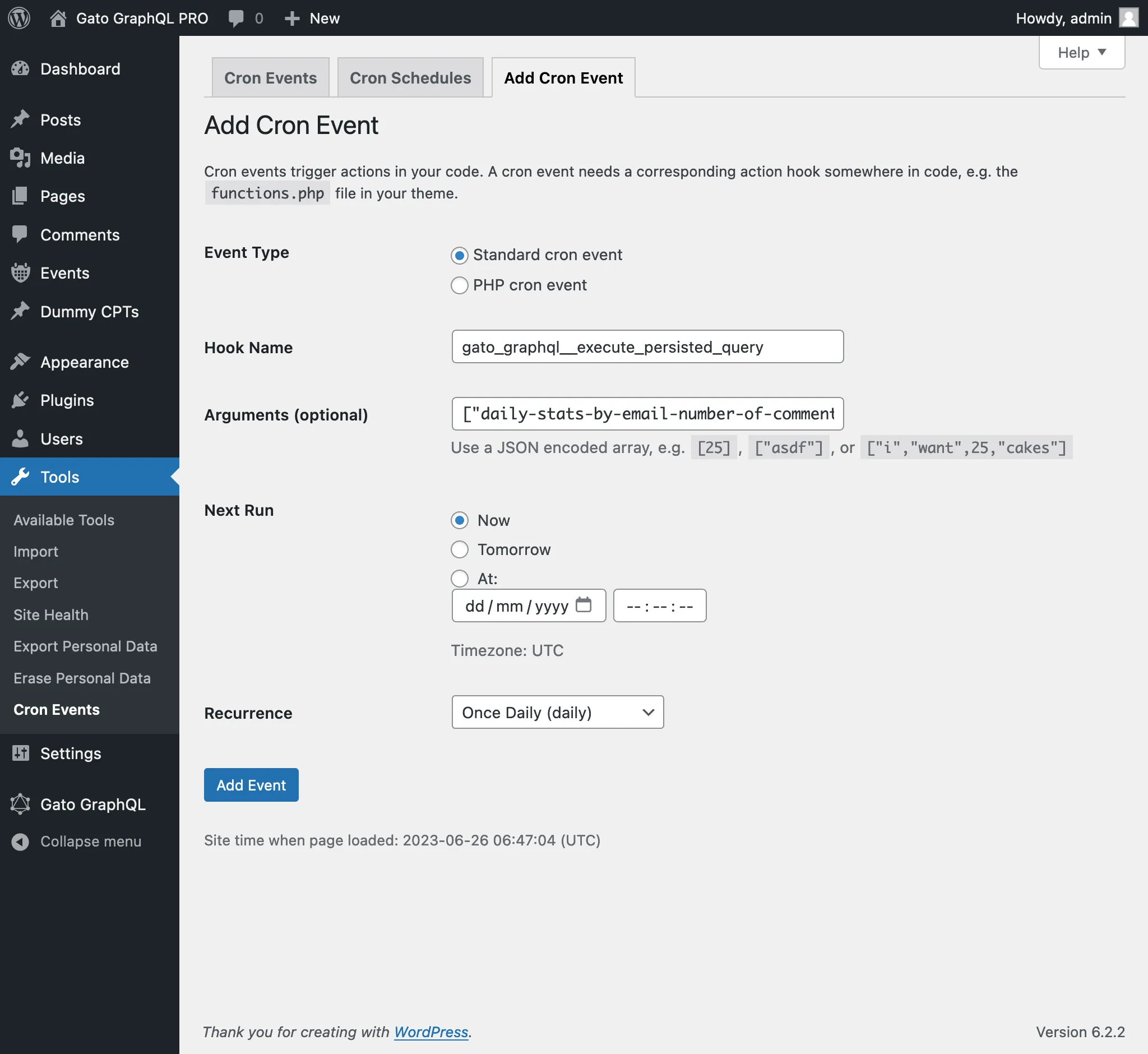
WP-Cron olayına iletilen 4. argüman, GraphQL query çalıştırılırken oturum açmış olması gereken kullanıcının kimliği (int olarak) veya kullanıcı adıdır (string olarak).
(Bu durumda, 1 değeri yönetici kullanıcının kimliğidir; "admin" kullanıcı adı da kullanılabilirdi.)
Bu argümanı iletmek genellikle mutations çalıştırırken gereklidir; çünkü bunların çoğu, (uygun yeteneklere sahip) bir kullanıcının oturum açmış olmasını gerektirir.